Client-side event tracking broadly falls into three categories:
- Code-based tracking
- Visual tracking
- Automatic tracking
This article mainly introduces the ideas and implementation process behind automatic tracking.
1. Code-based tracking
Code-based tracking means calling an interface at each point you want to track, directly uploading event data. Most third-party analytics services provide a code-based tracking api, which is convenient.
But this creates a problem: tracking code is scattered throughout the business logic and tightly coupled to it. When screens or business flows change, it is unclear what to do with old events or whether new ones are needed. As the event count grows, maintaining scattered tracking code becomes a nightmare. Macros and factory classes can simplify the code, but they do not fundamentally change this.
- (void)viewDidDisappear:(BOOL)animated {
    [super viewDidDisappear:animated];
    // 埋点
    APE(kEvent4001);
}
2. Visual tracking
Visual tracking configures collection points through a visual tool. The client automatically parses the configuration and reports events, producing so-called “traceless tracking.” One representative open-source solution is Mixpanel.
3. Automatic tracking
Automatic tracking, also called full-event tracking, does not really mean there is no instrumentation. It collects and reports all events, leaving the server to filter out useful data.
As a further optimization, the server can send a configuration file so that the client filters events itself.
For the KPIs, I reinvented the wheel around this idea and built WKTrackingData.
Here I record some problems and ideas from implementing WKTrackingData.
The implementation idea is simple. The code is organized as follows:
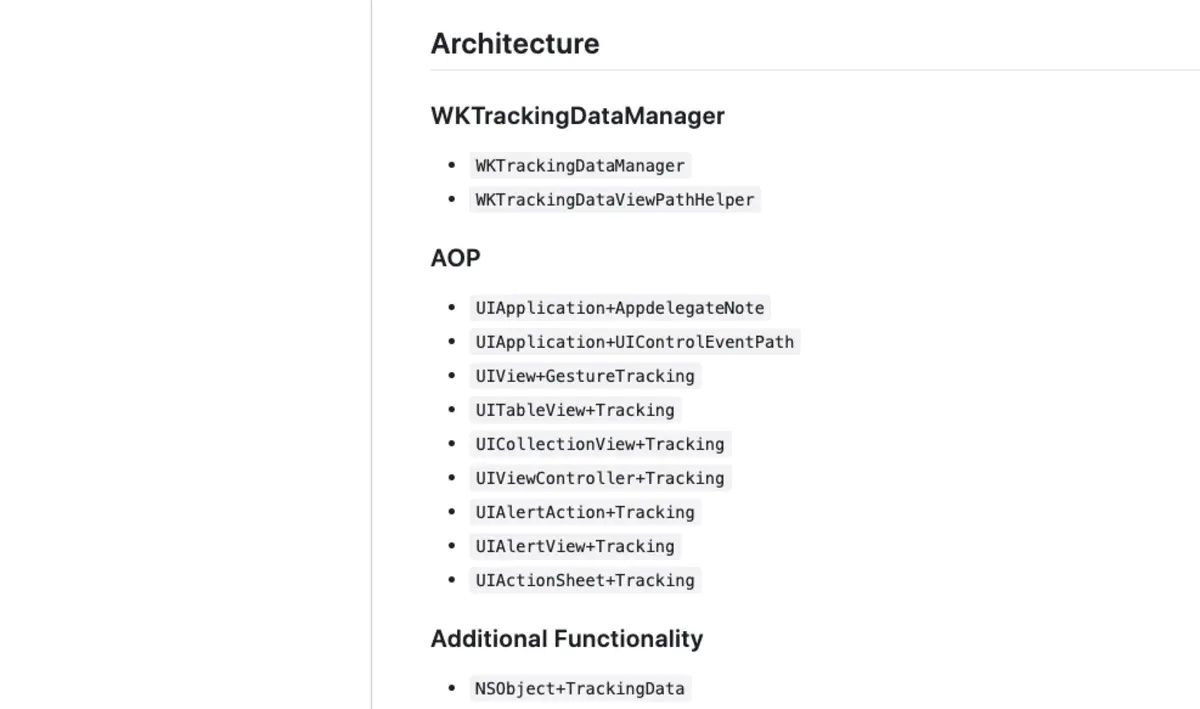
Here, WKTrackingDataManager handles all data management and event tracking configuration.
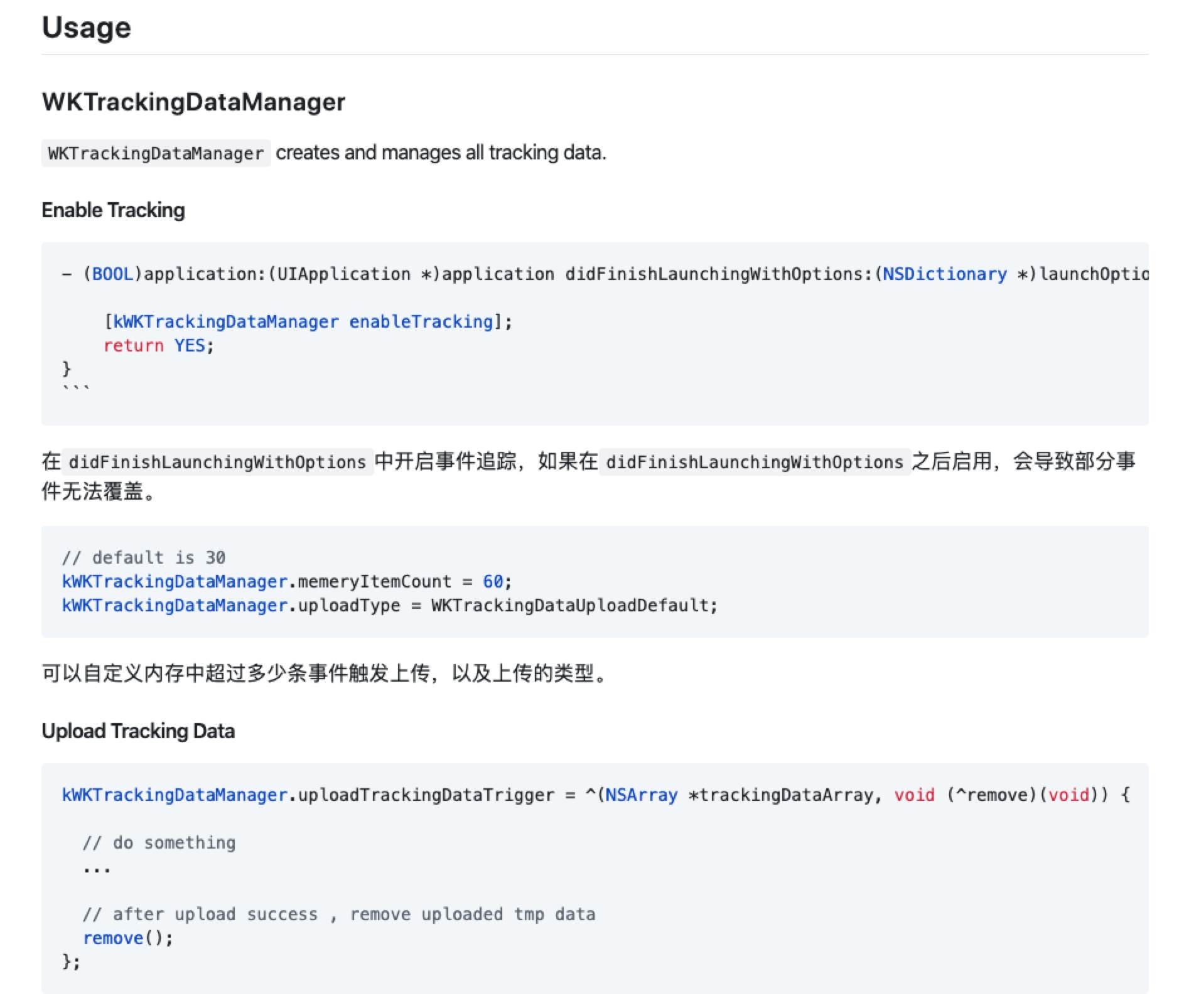
WKTrackingDataViewPathHelper generates event_path values.
AOP is the module responsible for tracking every event.
For detailed usage, visit GitHub.
How can an event be uniquely identified?
There are two questions: how do we represent an event, and how do we ensure its uniqueness?
Representing an event
Events are represented using event_path. For the responder that triggers an event, the core idea is to follow its responder chain and build that chain's path.
The resulting responder path looks like this:
"event_path" = "#buttonClick:#UIButton#UIButton[0]#UIView[0]#ViewController#...#UIApplication#AppDelegate
Uniquely identifying an event
In some business scenarios, the same button or other control represents different business events as its properties change.
For example, a home screen button may show Tap to sign in while signed out, then Verify identity after sign-in if identity verification is still incomplete.
For that same button, the view tree has not changed, so its generated responder path remains the same.
Similar cases include the on/off state of UISwitch, the UISegmentedControl property indexSelect, UIStepper, and UITableView or UICollectionView interactions with a cell.
To handle this, WKTrackingData builds event_path by selectively appending properties of the control itself. The resulting event_path then looks like this:
"event_path" = "#buttonClick:#UIButton#UIButton[0]#UIView[0]#ViewController#...#UIApplication#AppDelegate#currentTitle=Button#state=1#enabled=1#selected=0";
Business-specific extensions
Consider another scenario: a home screen banner carousel.
banner placements each have an image and destination url supplied by the server, and their positions are configurable.
Here, the banner at each index does not have a fixed destination. The event at position 0 cannot be determined from event_path alone.
To uniquely identify the event, we need to append business-specific parameters such as the url.
WKTrackingData also supports business parameter extensions, allowing the caller to append custom parameters:
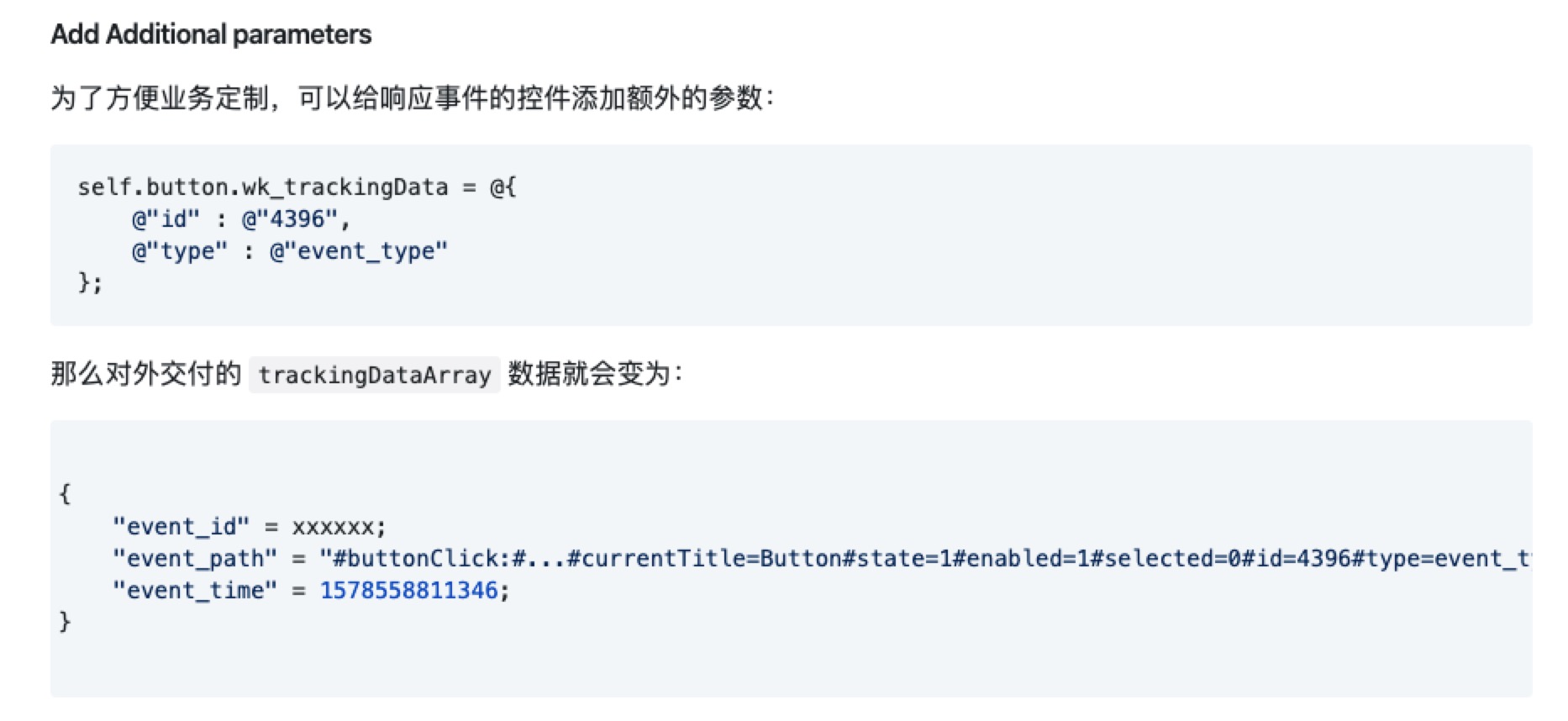
Controls that should not be tracked can be excluded using wk_ignoreTracking:
self.slider.wk_ignoreTracking = YES;
Other issues
To track different events, WKTrackingData follows an aspect-oriented approach and uses the runtime to swizzle methods directly.
For tracking UIAlertView, UIActionSheet, UITableView and UICollectionView, however, we need to swizzle their delegate methods.
If the
delegate classalready implements the method, simply swizzle it.If the
delegate classdoes not implement it and we still want to track the event, we need to add an implementation of the correspondingdelegate methodmanually.
- (void)wk_swizzleInstanceSelector:(SEL)origSel_ fromClass:(Class)fromClass replaceSelector:(SEL)replaceSel_ originNotImp:(SEL)notImpSel_ {
    Method originalMethod = class_getInstanceMethod([self class], origSel_);
    if (originalMethod) {
        [self wk_swizzleInstanceSelector:origSel_ fromClass:fromClass replaceSelector:replaceSel_];
    } else {
        Method notImpMethod = class_getInstanceMethod(fromClass, notImpSel_);
        // 如果delegateClass没有实现 origSel_ 方法
        // 则给delegateClass的 origSel_ 添加 orginReplaceMethod 的实现
        BOOL didAddNotImpMethod =
        class_addMethod([self class],
                        origSel_,
                        method_getImplementation(notImpMethod),
                        method_getTypeEncoding(notImpMethod));
        if (didAddNotImpMethod) {
            NSLog(@"%@ did add not imp method %@" , NSStringFromClass([self class]) , NSStringFromSelector(notImpSel_));
        }
    }
}
In practice, however, with UITableView and UICollectionView, when their delegate objects did not implement the method, manually adding tableView:didSelectRowAtIndexPath: with an implementation still did not cause it to fire.
First, look at the normal tableView:didSelectRowAtIndexPath: call stack:
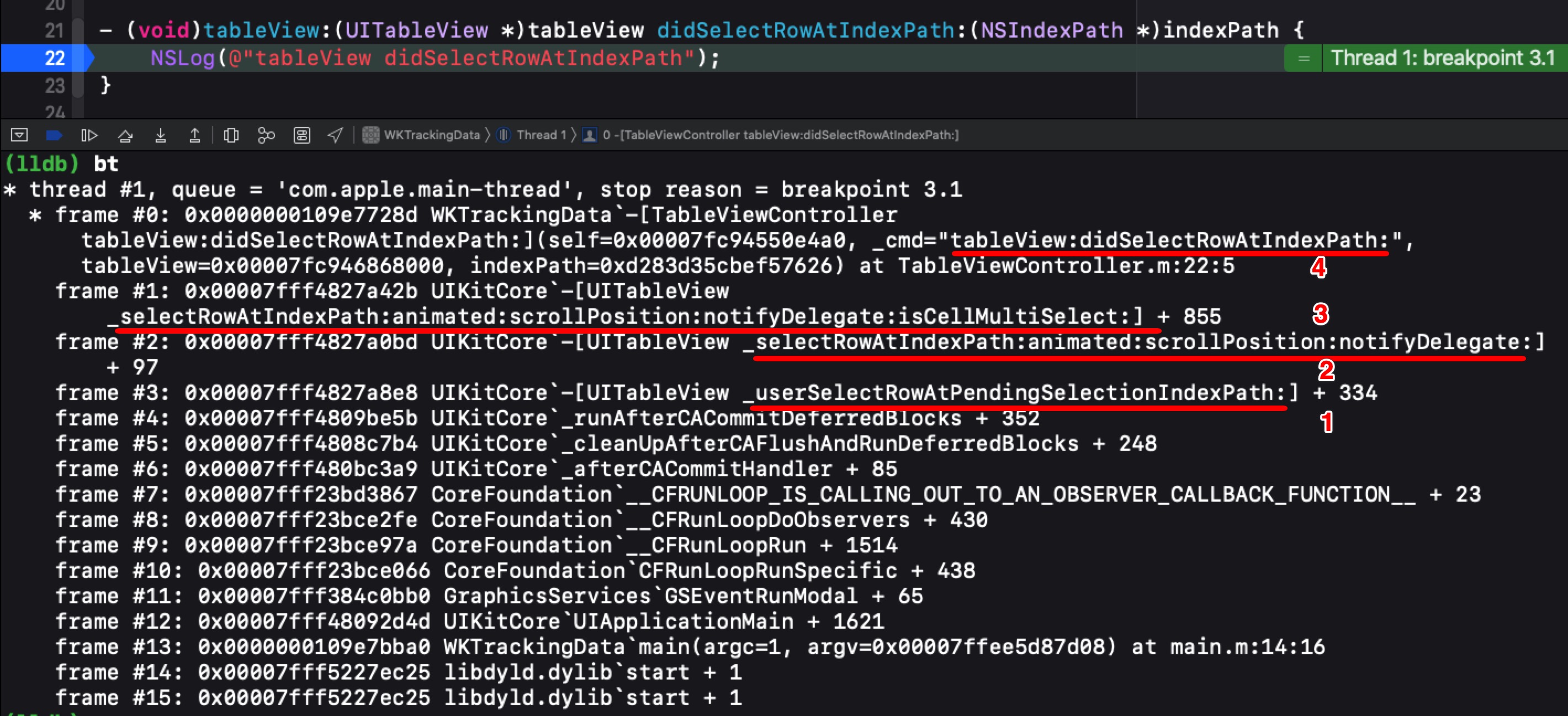
Here, UITableView calls these four methods in sequence to respond to a cell tap:
- 1. [UITableView _userSelectRowAtPendingSelectionIndexPath:]
- 2. [UITableView _selectRowAtIndexPath:animated:scrollPosition:notifyDelegate:]
- 3. [UITableView _selectRowAtIndexPath:animated:scrollPosition:notifyDelegate:isCellMultiSelect:]
- 4. [TableViewController tableView:didSelectRowAtIndexPath:]
The call order shows that UITableView calls the delegate class method tableView:didSelectRowAtIndexPath: only after first invoking its own _selectRowAtIndexPath:animated:scrollPosition:notifyDelegate:isCellMultiSelect: method.
Set a breakpoint on _selectRowAtIndexPath:animated:scrollPosition:notifyDelegate:isCellMultiSelect: and inspect the assembly:
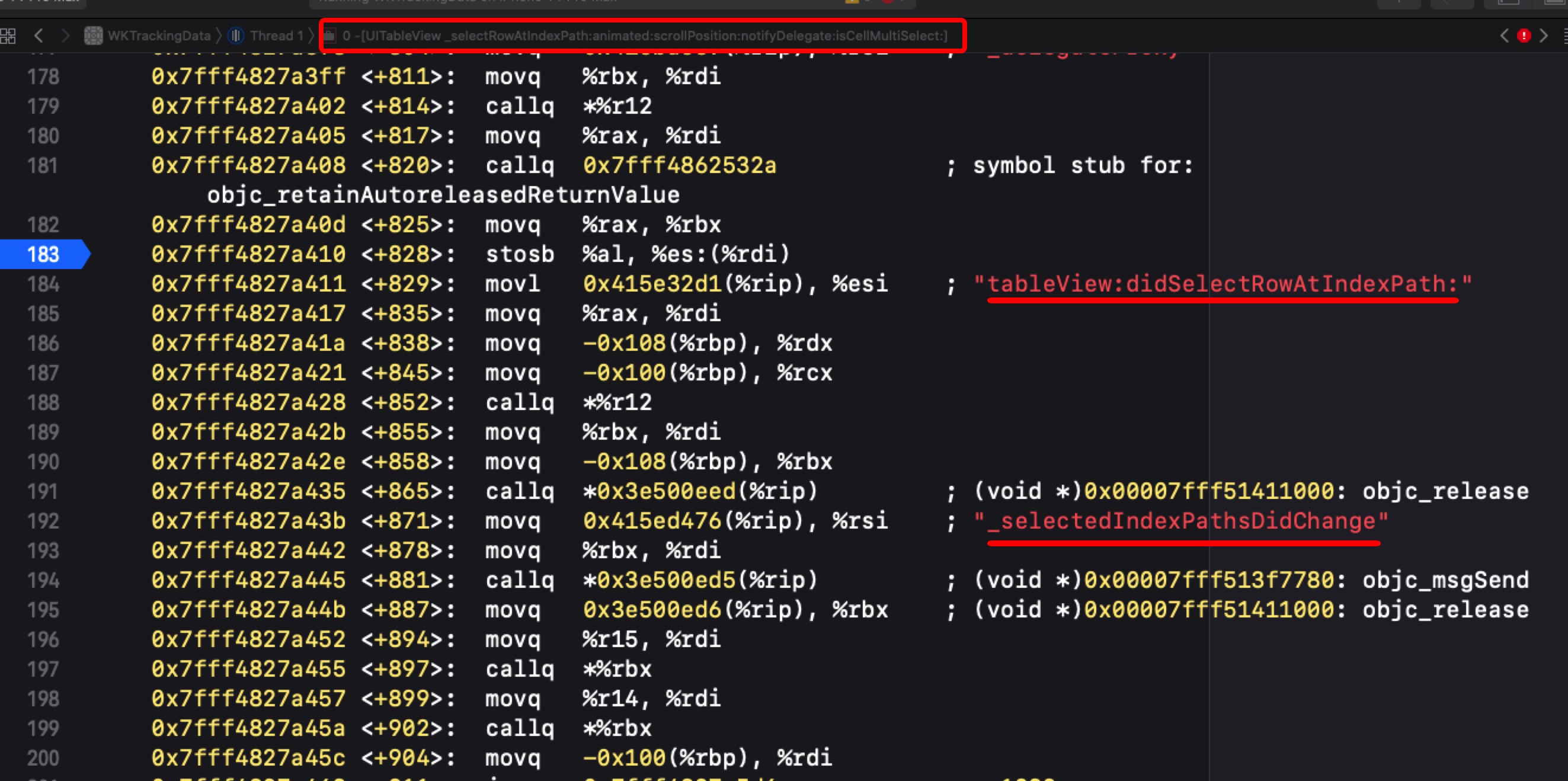
If the delegate class implements tableView:didSelectRowAtIndexPath:, everything works and the tableView:didSelectRowAtIndexPath: call completes.
But if the delegate class does not implement tableView:didSelectRowAtIndexPath:, even manually adding tableView:didSelectRowAtIndexPath: with an implementation does not cause an attempt to respond to tableView:didSelectRowAtIndexPath:.
Following the assembly reveals a direct jump to another instruction.
WKTrackingData takes a different approach here, directly swizzling [UITableView _userSelectRowAtPendingSelectionIndexPath:] (with a similar approach for UICollectionView). This enables UITableView and UICollectionView to track interactions even when the delegate object does not implement the corresponding cell event method.
4. Closing thoughts
Multiple event_path values for the same event
Consider multiple released versions with slight differences in their screens. The same event may then have multiple event_path values.
In practice, this mapping needs cooperation from server-side colleagues. It can be made configurable in the backend.
Optimizing event analytics
The business-specific extensions section described adding business parameters. WKTrackingData implements this through categories.
In practice, full-event tracking wasted a great deal of bandwidth. Many of those events were unnecessary [(ŏ_ŏ)].
A further optimization is for the server to send a configuration file listing every event it wants reported. Only an event_path matching the configuration is uploaded.
At this point, business parameters can also be retrieved without WKTrackingData: directly use kvc instead.
For example:
key_path = "viewController.banner.url"
If you have read this far, open WKTrackingData and give it a star. If you have questions, open an issue on GitHub or leave a comment below!